 hromada
@hromada/recpack 1.12 · zero dependencies · apache-2.0
Your JSON,many times smaller.Back byte for byte.
recpack packs arrays of JSON objects, big tables and large files into compact blocks, and gives back exactly what went in: the same keys in the same order, the same numbers, the same strings. For logs, scraped pages, API answers, analytics and history that would otherwise fill the disk.
npm i @hromada/recpackWhat it solves
JSON is easy to write and huge to keep. gzip helps, but recpack knows it is looking at records and does better, without changing a single byte of what comes back.
Shrink JSON records
1 000 log records: 155 KB as JSON, 17 KB gzipped, 13 KB with recpack. Exactly the same JSON back.
02Keep only what changed
A day of a 2 000-product catalogue's history: 0.4 KB of changes instead of a 15 KB copy.
03Big tables, one column at a time
100 000 analytics rows: 2.2 MB as CSV, 250 KB packed. Sum one column without reading the rest.
04Checked backups
A big file archived in pieces, each with its own SHA-256, restored and checked.
How it works, in plain words
The trick is to stop storing records one after another and store them as columns.
url values go together, all the status values together, and so on. Similar values side by side compress far better.JSON.stringify(unpack(block)) === JSON.stringify(records), always: key order, numbers past 2^53 and odd strings included.FormatError, never something else, and every reader has size limits on by default.Examples
Each one is a whole file from the repository's examples/ folder, with its own made-up data, run by the tests on every change. The output under each one is a real run, made when this site was built.
git clone https://github.com/Olexan-art/recpack && cd recpack
npm ci && npm run build
node examples/01-shrink-json.mjs01Shrink JSON logs, API answers or scraped pages
You keep thousands of JSON records: request logs, crawl results, API responses. They take a lot of disk, and you cannot afford to lose a byte of them.
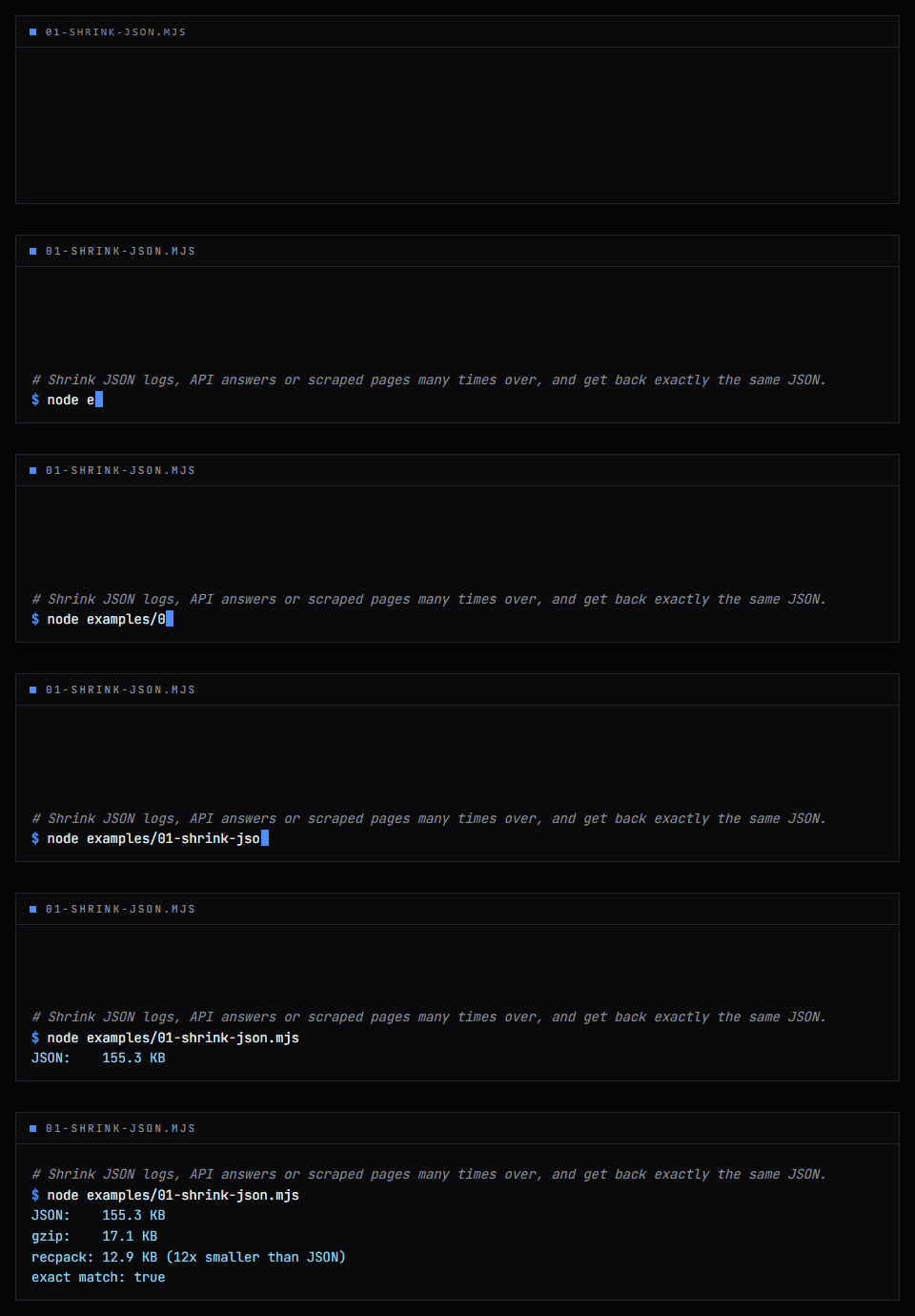
// Shrink JSON logs, API answers or scraped pages many times over, and get back exactly the same JSON.
// Run it: node examples/01-shrink-json.mjs
import { gzipSync } from "node:zlib";
import { pack, unpack } from "@hromada/recpack";

let seed = 1; const rnd = (n) => (seed = (seed * 16807) % 2147483647) % n; // the same "random" data every run
const sites = ["shop.example", "blog.example", "docs.example"], tags = ["new", "sale", "kids", "garden", "tools"];
const rows = Array.from({ length: 1000 }, (_, i) => ({
  url: `https://${sites[rnd(3)]}/item/${10_000 + rnd(5000)}`,
  status: rnd(20) ? 200 : 404,
  fetchedAt: new Date(Date.UTC(2026, 10, 1) + i * 60_000).toISOString(),
  title: `Item ${rnd(5000)} - ${tags[rnd(5)]}`,
  tags: [tags[rnd(5)], tags[rnd(5)]],
  bytes: 20_000 + rnd(80_000),
}));

const json = Buffer.from(JSON.stringify(rows)), gz = gzipSync(json), block = pack(rows);
const kb = (n) => `${(n / 1024).toFixed(1)} KB`;
console.log(`JSON:    ${kb(json.length)}`);
console.log(`gzip:    ${kb(gz.length)}`);
console.log(`recpack: ${kb(block.bytes.length)} (${(json.length / block.bytes.length).toFixed(0)}x smaller than JSON)`);
// keep both: block.codec (a number) and block.bytes
console.log(`exact match: ${JSON.stringify(unpack(block)) === JSON.stringify(rows)}`);JSON: 155.3 KB
gzip: 17.1 KB
recpack: 12.9 KB (12x smaller than JSON)
exact match: trueWhat happens
pack(rows)returns{ codec, bytes }. Keep both:codecis one small number that says how the bytes were made.unpack(block)gives the records back; the last line proves they are the same JSON, character for character.- The win over gzip comes from the columns: URLs, dates, statuses and tags repeat, and columns put the repeats together.
Pack in batches of a few hundred to tens of thousands of records. One record per block compresses badly. Records with the same keys shrink most.
02A daily history without the disk filling up
You snapshot a catalogue, a price list or a website every day to see what changed. A full copy a day grows fast, even though only a few percent changes.
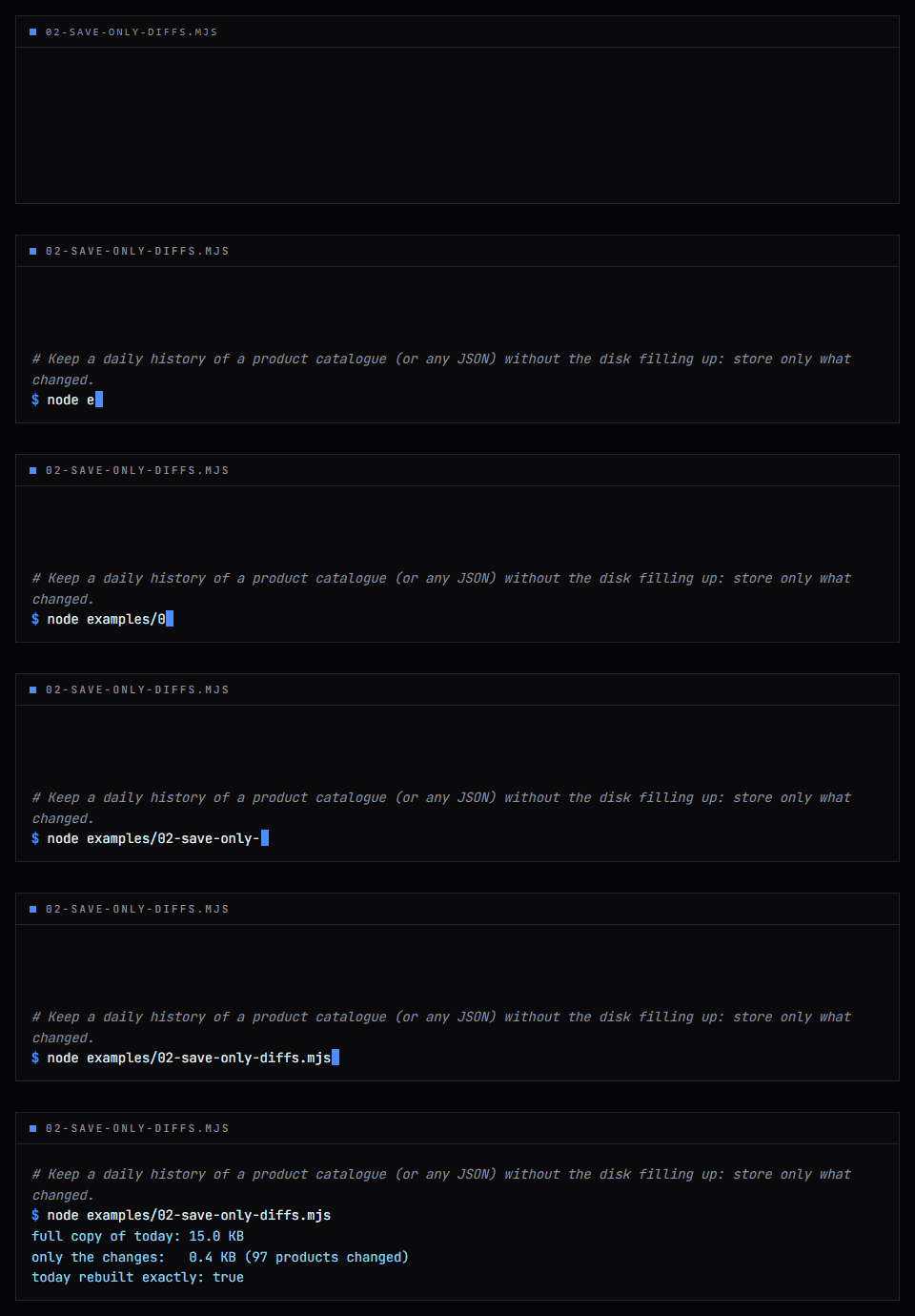
// Keep a daily history of a product catalogue (or any JSON) without the disk filling up: store only what changed.
// Run it: node examples/02-save-only-diffs.mjs
import { applyPatch, pack, patch, unpack } from "@hromada/recpack";

let seed = 7; const rnd = (n) => (seed = (seed * 16807) % 2147483647) % n;
const yesterday = Array.from({ length: 2000 }, (_, i) => ({
  id: i, name: `Product ${i}`, price: 5 + rnd(500), stock: rnd(100),
  specs: { color: ["red", "blue", "green"][rnd(3)], weightKg: rnd(50) / 10, madeIn: "UA" },
}));
const today = structuredClone(yesterday);
for (let k = 0; k < 100; k++) { const p = today[rnd(today.length)]; p.price += 1; p.specs.color = "black"; } // 5% changed

// the day's change: one small patch per product that changed
const changes = [];
today.forEach((cur, i) => { const p = patch(yesterday[i], cur, { deep: true }); if (Object.keys(p).length) changes.push({ id: cur.id, p }); });

const full = pack(today), diff = pack(changes);
console.log(`full copy of today: ${(full.bytes.length / 1024).toFixed(1)} KB`);
console.log(`only the changes:   ${(diff.bytes.length / 1024).toFixed(1)} KB (${changes.length} products changed)`);

// rebuilding today from yesterday and the stored changes
const rebuilt = structuredClone(yesterday);
for (const { id, p } of unpack(diff)) rebuilt[id] = applyPatch(rebuilt[id], p);
console.log(`today rebuilt exactly: ${JSON.stringify(rebuilt) === JSON.stringify(today)}`);full copy of today: 15.0 KB
only the changes: 0.4 KB (97 products changed)
today rebuilt exactly: trueWhat happens
patch(yesterday, today, { deep: true })describes only what changed in an object, nested fields included. An unchanged product gives an empty patch, which is skipped.- The day's patches are packed like any other records.
applyPatch(old, p)turns yesterday back into today. The last line proves the rebuild is exact.
Keep a full copy now and then (once a week, say) and the patches in between: any day can then be rebuilt from the copy before it.
03100 000 rows in one small file, one column read alone
Analytics exports, metrics, price histories: many rows, a few columns, mostly numbers. CSV is big and slow to read, and you often need just one column.
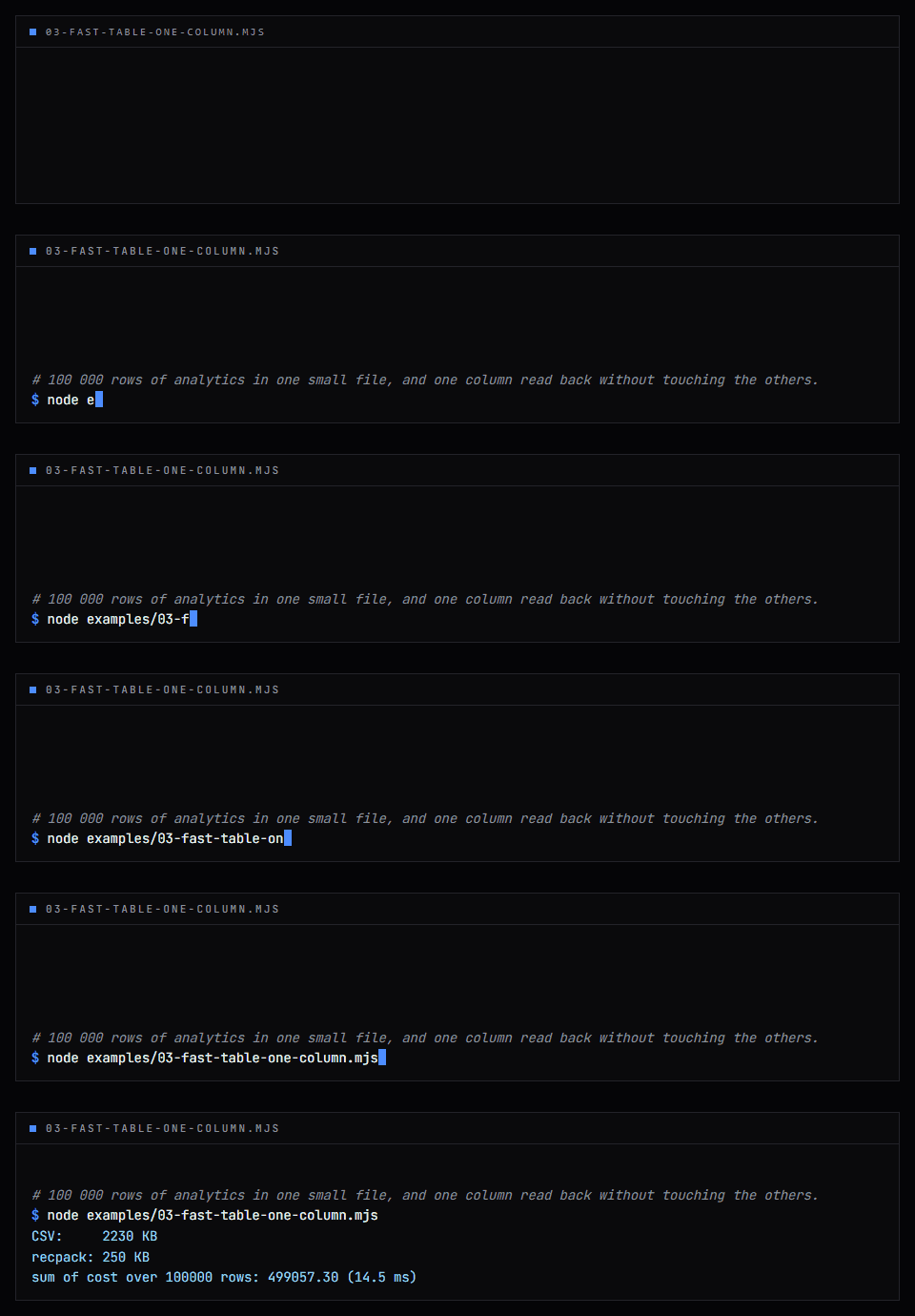
// 100 000 rows of analytics in one small file, and one column read back without touching the others.
// Run it: node examples/03-fast-table-one-column.mjs
import { packTable, unpackTable } from "@hromada/recpack";

let seed = 3; const rnd = (n) => (seed = (seed * 16807) % 2147483647) % n;
const N = 100_000, pages = ["/", "/pricing", "/blog", "/docs", "/signup"];
const day = [], page = [], clicks = [], cost = [];
for (let i = 0; i < N; i++) { day.push(20260101 + Math.floor(i / 1000)); page.push(pages[rnd(5)]); clicks.push(rnd(40)); cost.push(rnd(1000) / 100); }

const buf = packTable({ day, page, clicks, cost }, { delta: ["day"] }); // "day" grows: stored as steps
const csv = ["day,page,clicks,cost", ...day.map((d, i) => `${d},${page[i]},${clicks[i]},${cost[i]}`)].join("\n");
console.log(`CSV:     ${(csv.length / 1024).toFixed(0)} KB`);
console.log(`recpack: ${(buf.length / 1024).toFixed(0)} KB`);

const t0 = performance.now();
const { cols } = unpackTable(buf, { columns: ["cost"], typed: true }); // only "cost" is decoded, as a Float64Array
let total = 0; for (const c of cols.cost) total += c;
console.log(`sum of cost over ${cols.cost.length} rows: ${total.toFixed(2)} (${(performance.now() - t0).toFixed(1)} ms)`);CSV: 2230 KB
recpack: 250 KB
sum of cost over 100000 rows: 499057.30 (13.4 ms)What happens
packTabletakes columns (arrays of equal length) and returns oneBufferyou can write to a file.delta: ["day"]: a column that only grows is stored as the steps between values, mostly zeros here.unpackTable(buf, { columns: ["cost"], typed: true })decodes onlycost, as aFloat64Array; the other columns are skipped without being decompressed.
Sorting rows by a column that repeats (day, page) before packing makes the file smaller still: reorder(cols, orderBy(cols, ["day", "page"])).
04A compact, checked backup of a big file
You back up exports, dumps or logs. You want them small, and you want to know for sure that what you restore is what you saved.
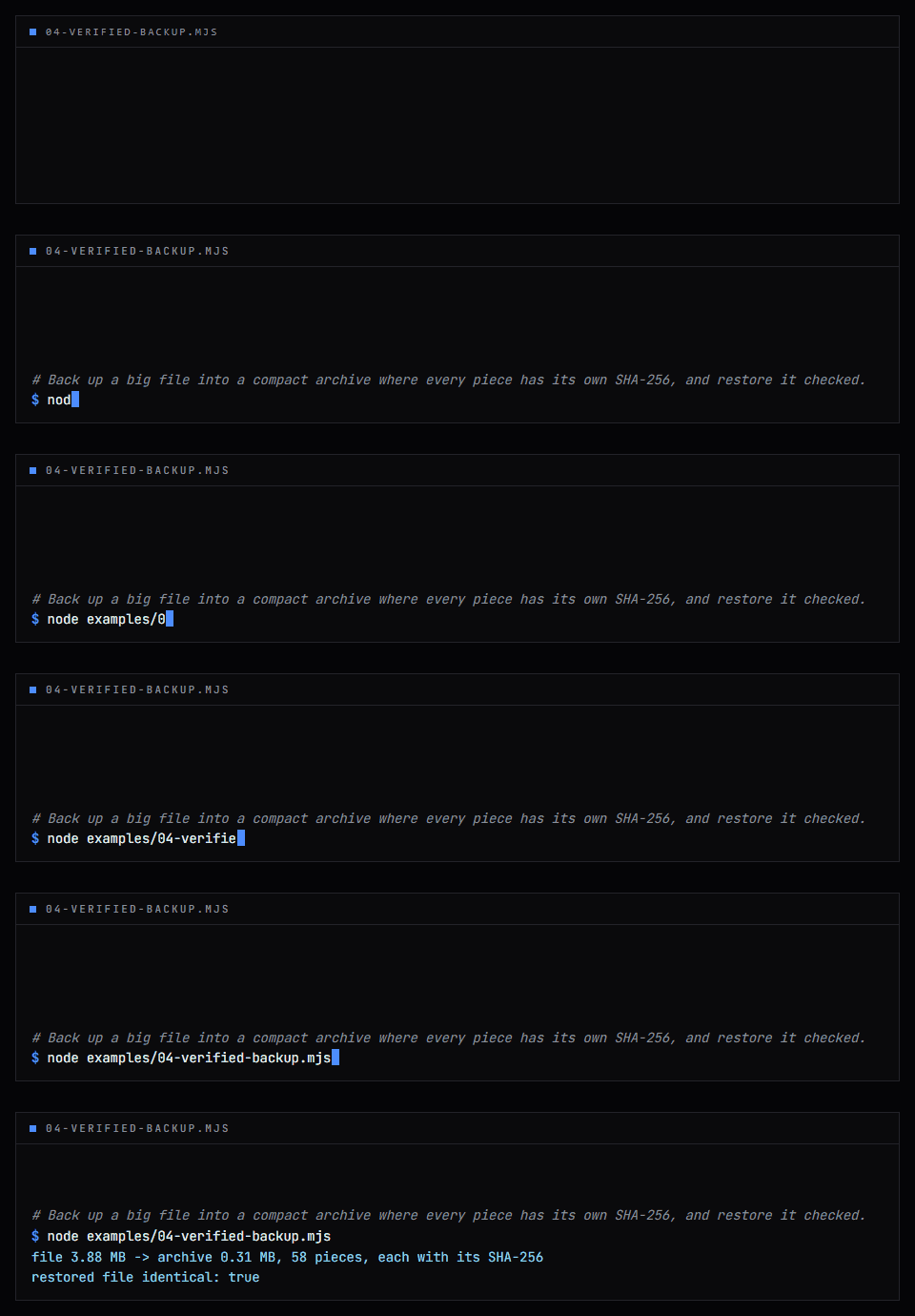
// Back up a big file into a compact archive where every piece has its own SHA-256, and restore it checked.
// Run it: node examples/04-verified-backup.mjs
import { createHash } from "node:crypto";
import { mkdtempSync, readFileSync, rmSync, writeFileSync } from "node:fs";
import { tmpdir } from "node:os";
import { join } from "node:path";
import { archiveFileAsync, archiveInfoAsync, extractFileAsync } from "@hromada/recpack";

const tmp = mkdtempSync(join(tmpdir(), "recpack-backup-"));
const src = join(tmp, "events.jsonl");
writeFileSync(src, Array.from({ length: 100_000 }, (_, i) => JSON.stringify({ i, user: `u${i % 997}`, event: i % 7 ? "view" : "buy" })).join("\n"));

// pieces of about 64 KB cut by content: an edit later changes only the pieces around it
await archiveFileAsync(src, join(tmp, "events.rpa"), { cdc: 64 * 1024 });
const info = await archiveInfoAsync(join(tmp, "events.rpa"));
const size = (f) => (readFileSync(f).length / 1024 / 1024).toFixed(2) + " MB";
console.log(`file ${size(src)} -> archive ${size(join(tmp, "events.rpa"))}, ${info.chunks.length} pieces, each with its SHA-256`);

await extractFileAsync(join(tmp, "events.rpa"), join(tmp, "restored.jsonl")); // every piece is checked on the way out
const sha = (f) => createHash("sha256").update(readFileSync(f)).digest("hex");
console.log(`restored file identical: ${sha(src) === sha(join(tmp, "restored.jsonl"))}`);
rmSync(tmp, { recursive: true, force: true });file 3.88 MB -> archive 0.31 MB, 58 pieces, each with its SHA-256
restored file identical: trueWhat happens
archiveFileAsynccuts the file into pieces of about 64 KB, compresses each, and records each one's SHA-256.- The cuts follow the content, so after an edit only the pieces around it differ: good for backups that keep versions.
extractFileAsyncchecks every piece on the way out and writes the file only when all of it is right. It never overwrites an existing file unless you sayoverwrite: true.- Photos and videos, which are compressed already, are stored as they are.
Use it with Cursor, Claude Code or Codex
Paste this into your AI coding agent. It reads the short guides written for agents and makes the change for you.
Read https://raw.githubusercontent.com/Olexan-art/recpack/main/llms.txt and
https://raw.githubusercontent.com/Olexan-art/recpack/main/AGENTS.md. Replace raw JSON.stringify storage in my project
with @hromada/recpack (pack/unpack or packTable/unpackTable), keeping exact JSON round-trip.
Tips and common mistakes
Keep the codec number
A block is { codec, bytes }. The bytes alone cannot be read. Store both, for example in two database columns.
Faster when size matters less
pack(rows, { level: 1 }) packs about twice as fast for about 9 % more bytes (measured on crawled pages). The default is 9.
Limits for input from others
Data from outside? Pass limits: unpack(b, { maxBytes }), unpackTable(b, { maxRows }), extractFile(a, f, { maxBytes }).
Do not block the server
Big blocks have async versions: packAsync, unpackAsync, packTableAsync, archiveFileAsync...
Columns of different length
packTable wants equal lengths; pass { ragged: true } if yours are not.
Not encryption
recpack makes data small, not secret. To send it between your computers encrypted, use hromada.
Words used here
- record
- One JSON object, like one log line or one product.
- block
- What
packreturns:{ codec, bytes }, many records packed together. - codec
- A small number saying how a block was made. Old numbers never change meaning, so old blocks stay readable.
- byte-exact
- What comes back turns into exactly the same JSON text as what went in.
- table
- Columns of equal length packed into one
BufferwithpackTable. - patch
- A description of what changed between two versions of an object.
- archive
- A file packed in pieces, each with its own SHA-256, made by
archiveFile.
Numbers
On real data (AMD Ryzen 9 8945HS, Node 22, Windows 11). Honest reading: zstd alone already does a lot on JSON; the columns add 13-19 % on top, more on records that repeat their structure, plus the exact round trip and column reads.
| Data | As JSON | Packed |
|---|---|---|
| 200 crawled web pages, batches of 50 | 1.73 MB | x14.6 smaller (zstd alone: x12.9) |
| Day x page history, 2.3 million rows | 51.2 MB | 8.8 MB; written in 1.3 s, read in 0.25 s |
| Page x query pairs, 100 000 rows | 16.3 MB | 1.1 MB (x14.4) |
| JSON lines file, archived | 9.2 MB | 0.73 MB, at 367 MB/s |
Questions people ask
How do I compress JSON in Node.js without losing anything?
pack(records) from @hromada/recpack returns { codec, bytes }, and unpack gives records back whose JSON.stringify is exactly the same string: key order, large numbers and unusual strings included. See it run.
How is recpack different from gzip or zstd?
gzip and zstd compress bytes; recpack first turns records into columns (repeated keys stored once, numbers as small numbers, dates as steps, repeated strings once) and then uses zstd or brotli. On real records the ratio is 13-19 % better than zstd alone, more when records repeat their structure, and it lets you read one column of a table without the rest.
Can I read one column of a big table without loading the rest?
Yes: unpackTable(buf, { columns: ["price"], typed: true }) decodes only that column, as a Float64Array; the other columns are skipped without being decompressed. Example with 100 000 rows.
Is recpack a database?
No. It is a storage format: no indexes and no queries. Keep its blocks in files or in a database column; use SQLite, DuckDB or Parquet when you need queries.
Is it safe to unpack data from someone else?
Every decoder has size limits on by default, and anything wrong with a block, table or archive throws FormatError, never another kind of error. recpack does not encrypt or sign; send data over an encrypted channel such as hromada when that matters.
What does it need?
Node.js 22.15 or later, for zstd in node:zlib. No dependencies at all.
When not to use it
- You need queries. It is a format, not a database. Use SQLite, DuckDB or Parquet.
- Other languages must read it. It is Node.js only for now; Parquet and Arrow are readable everywhere.
- Tiny payloads. Under a few hundred bytes, plain JSON with zstd is as good.
- Secrecy. It does not encrypt or sign.
- Browsers. It needs Node's zstd (Node 22.15+).
More: README · AGENTS.md · FORMAT.md (the byte layout) · SECURITY.md · CHANGELOG